How to Optimise Your Website Images for SEO
(A practical guide for wedding vendors who care about quality — and visibility)
You’ve just uploaded the photos.
Not just any photos. Those ones. The ones from that extraordinary wedding you’re still thinking about weeks later. The light was perfect. The styling landed exactly how you imagined it. The photographer has delivered a gallery that makes you feel a little smug in the best possible way.
You wait for the files, you download them, and you upload them straight from the gallery. Because why wouldn’t you? They’re high quality. That’s the point. Your work deserves to be shown properly.
You refresh your site. Scroll. Pause. Scroll again.
Yes. This finally looks like you.
A day or two later, a vendor friend clicks through your site. Someone you trust. Someone who knows the industry and isn’t easily impressed. They don’t comment on the styling or the photos at first. They just say,
“Hey… your site’s loading pretty slowly.”
You open it on your phone.
They’re right.
The images hesitate. One loads, then another. There’s that awkward moment where you can scroll, but nothing’s really there yet. Long enough that, if you were a couple half-watching Netflix and half-planning a wedding, you might already be gone.
This is the part no one warns you about. The very thing that proves the quality of your work (those beautiful, high-resolution images) is often the thing quietly undermining your visibility.
Not because you did anything wrong. Because websites and photography speak different languages.
What SEO actually means, in practice
SEO, search engine optimisation, is not a dark art. It’s not about tricking Google, and it’s certainly not about gaming the system.
At its core, SEO is simply how search engines decide three things:
who to show,
when to show them,
and whether their website is worth sticking with.
For wedding businesses, SEO does two particularly important jobs.
First, it helps the right couples find you at all, especially when they’re searching by location. Second, it helps your website perform well enough that those couples don’t disappear before they enquire.
Images affect both.
Search engines can’t “see” a photograph the way we do. They don’t understand mood, style, or taste. They understand file size, file names, and descriptions. When those elements are vague or heavy, your site becomes harder to index and slower to load. Neither of those things work in your favour.
The good news is that fixing this is not super technical. It’s procedural.
Why wedding images are usually the problem (and why that’s not your fault)
Wedding photos are delivered large for a reason. They’re intended for albums, prints, and long-term storage. That’s correct for photography. It’s not correct for websites.
When you upload those files straight to your site, three predictable things happen. Your pages become heavier than they need to be, your images become harder for search engines to interpret, and mobile users pay the price.
None of this makes your site “bad.” It just makes it inefficient.
Optimising images is simply the act of translating them from photography files into website assets.
The only process you actually need
We are going to do four things. Always in this order. No tools. No plugins. Just your laptop and a small amount of dedicated time.
Step one: Convert the image to JPEG
This comes first because file type has a direct impact on file size.
Photographs should almost always be saved as JPEGs. PNGs are heavier and designed for graphics, logos, and transparency, not photographic detail. Converting to JPEG alone often reduces the file size significantly before you touch anything else.
Open the image and save or export it as a JPEG. Do this before resizing. It makes the next step easier.
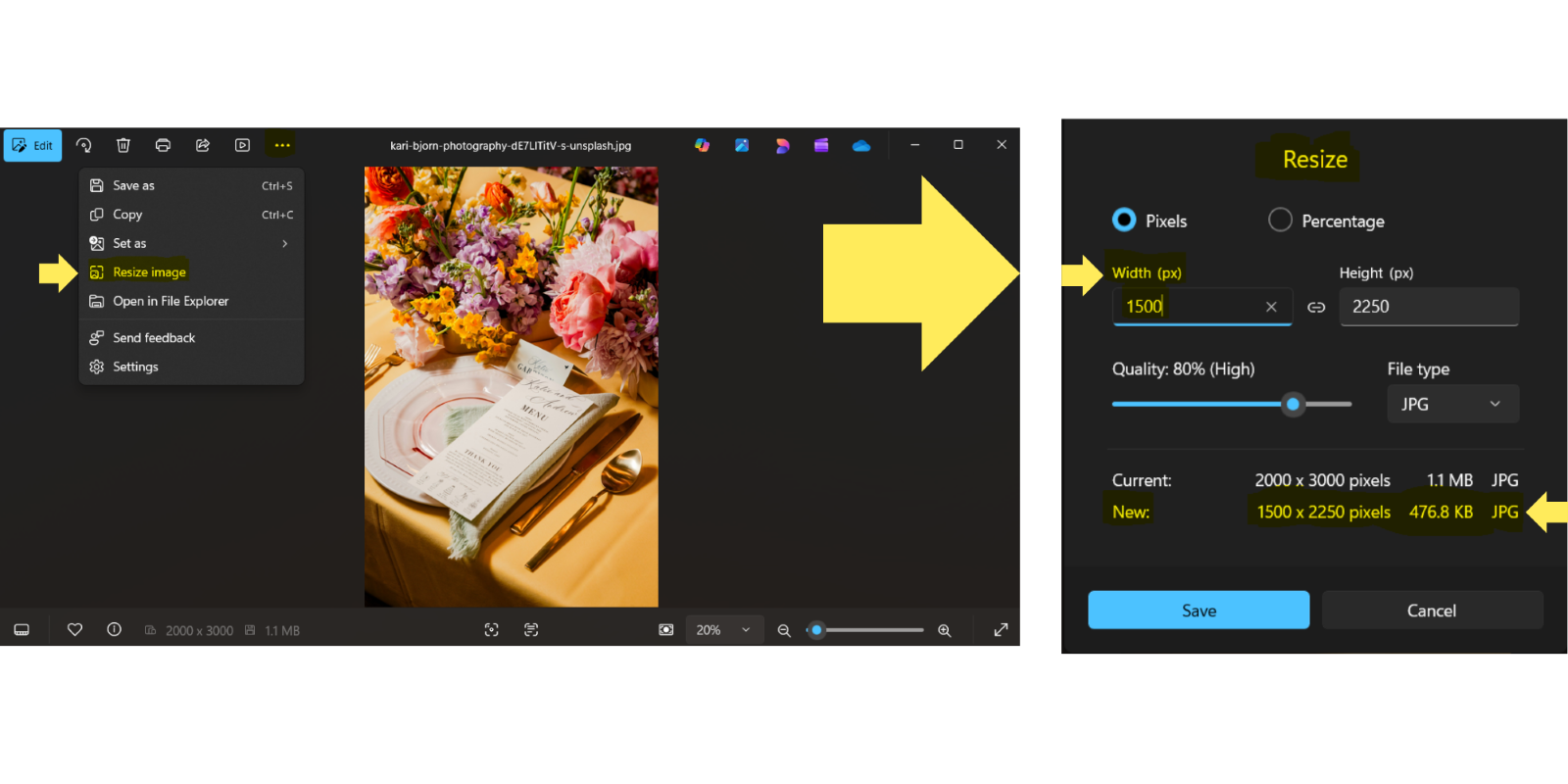
Step two: Resize the image to a sensible width
Websites do not need enormous images to look good.
As a general rule, resizing images to around 1500 pixels wide is more than sufficient for most uses. Large hero images can go up to 2500 pixels, but very few images need to be larger than that.
Resize the image proportionally, changing only the width. Don’t overthink it. You are not preparing this for print.
Step three: Get the file under 500kb
This is the step people skip, and it’s the one that matters most.
If the image is still over 500kb after resizing, it’s still heavier than it needs to be. Large images slow pages down, particularly on mobile, and page speed is a real factor in both SEO and user behaviour.
Check the file size. If it’s too large, resize slightly smaller and save again. Repeat until the file is under 500kb and still looks good.
If you can’t see a visible loss in quality, neither will your clients.
Step four: Name the file clearly (this is not alt text)
File names are one of the ways search engines understand what an image is about.
They should be descriptive, human-readable, and specific. This is also where location becomes important for wedding businesses.
Let’s use one example consistently.
A couple getting married at a vineyard in Margaret River.
A good file name would be:
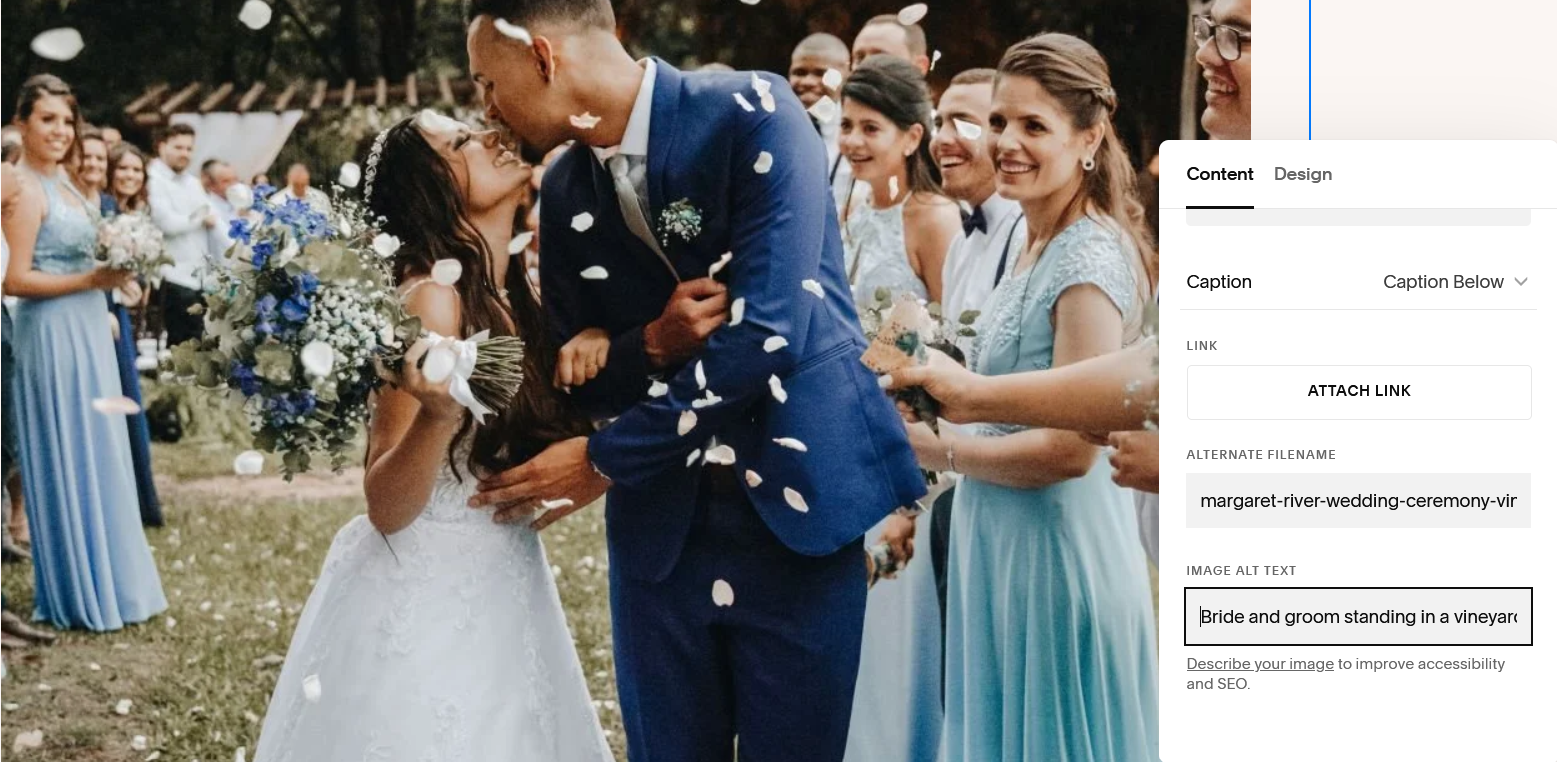
margaret-river-wedding-ceremony-vineyard.jpg
This tells a search engine exactly what it’s looking at: a wedding ceremony, in a vineyard, in Margaret River. No tricks. No keyword stuffing. Just clarity.
Rename the file before uploading it.
File name versus alt text (they are not the same thing)
This is where most people get confused, so let’s be precise.
A file name is a label.
Alt text is a description.
Alt text exists primarily for accessibility. It allows screen readers to describe images to users who can’t see them. Search engines also use it to understand image content.
Alt text should be written as a short, natural sentence.
Using the same example:
File name:
margaret-river-wedding-ceremony-vineyard.jpg
Alt text:
“Bride and groom standing in a vineyard during a Margaret River wedding ceremony.”
The file name is structured and factual. The alt text is human and descriptive. Both matter. They serve different purposes, and Google pays attention to both.
Do not repeat the file name as alt text. Do not stuff keywords. Describe what’s actually happening in the image, including location when it’s relevant.
Why this matters for your business, not just your website
Optimised images help search engines understand what you do and where you do it. They also help your site load faster, which affects how long people stay and how many pages they view.
SEO is not about forcing your site to rank. It’s about removing friction and adding the right information so the right people can find you and use your website without resistance.
When your images are correctly sized, clearly named, and properly described, your site becomes easier to index, easier to load, and easier to trust. That combination matters far more than most vendors realise.
The repeatable version (the only part worth memorising)
Every time you upload an image:
→ Convert it to JPEG.
→ Resize it to around 1500px wide.
→ Make sure it’s under 500kb.
→ Rename the file clearly, including location if relevant.
→ Upload it.
→ Add alt text that describes the image naturally.
That’s it. No spirals. No optimisation rabbit holes.
Why optimising images is worth doing
Here’s the honest truth: most wedding vendors will never do this.
They’ll keep uploading images straight from galleries, wondering why their site feels sluggish, why enquiries plateau, and why they’re invisible in search unless they’re paying for ads or leaning on Instagram. Not because they don’t care, but because SEO feels optional, technical, or like something to “get to later.”
That’s precisely why it’s such a powerful advantage.
Search visibility compounds. The vendors who build good habits early (even boring, unglamorous ones like optimising images) are the ones who consistently move ahead without making noise about it. Their sites load faster. Their pages rank more consistently. Google understands what they do, where they do it, and who they’re for.
And over time, they stop competing on volume and start being found by fit.
This isn’t about chasing algorithms or obsessing over rankings. It’s about making your website legible — to search engines, yes, but more importantly to the couples already looking for exactly what you offer.
If you want to rank higher than competitors who never touch their sites, this matters.
If you want to attract clients who value quality and intention, this matters.
If you want your past work to keep working for you long after it’s been posted, this matters.
The payoff isn’t immediate, and that’s the point. SEO rewards consistency, not bursts of effort. So don’t try to fix everything at once. That’s how people give up.
Start with new images. Optimise them properly. Replace old ones when you’re already updating a page anyway. Let the habits build quietly in the background.
That’s how good SEO actually works. Cumulative, strategic, and firmly in your control. And a year from now, you’ll be very glad you started.